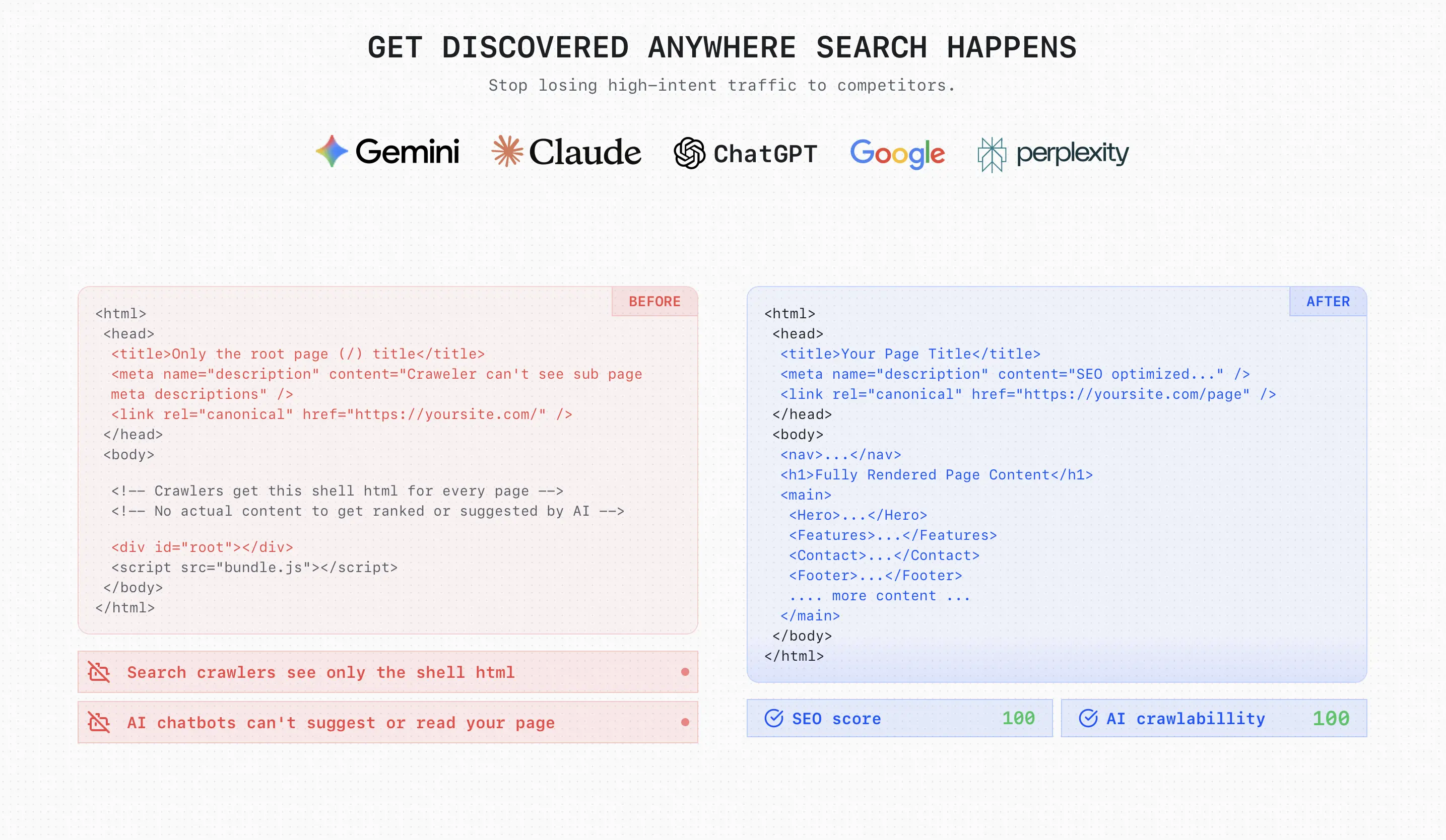
Prerender API - Win AI search
Prerender your CSR pages into HTML using Cloudflare Worker, Vercel or Netlify functions.
You must own the target domain (added to your Encited account). The API verifies domain ownership before rendering.
Auth header
Send your API key with one of these headers:
x-lovablehtml-api-key: <API_KEY>Authorization: Bearer <API_KEY>
Create/manage keys in the dashboard.
Render endpoint
GET /api/prerender/render?url=<ENCODED_URL>
Headers (one of):
x-lovablehtml-api-key: <API_KEY>Authorization: Bearer <API_KEY>
Behavior
- If prerendering applies: returns
200 text/htmlwith the page HTML. - If prerendering does not apply (static asset, non-HTML request, or browser navigation): returns
304withLocationheader pointing to the target URL. - If a configured redirect rule matches: returns
301withLocationheader set to the redirect target. Middleware should forward the301to the end client.
Example middleware handling for all three statuses:
const r = await fetch("https://encited.com/api/prerender/render?url=" +encodeURIComponent(req.url),{ headers: { "x-lovablehtml-api-key": API_KEY, accept: "text/html" } },);// 301 = configured redirect rule matched, forward to the end clientif (r.status === 301) {return new Response(null, {status: 301,headers: {Location: r.headers.get("location") ?? "/","Cache-Control": "no-store",},});}// 304 = not pre-rendered, pass through to originif (r.status === 304) return fetch(req);// 200 = rendered HTMLreturn new Response(await r.text(), {headers: { "content-type": "text/html; charset=utf-8" },});
Notes
- Static assets (e.g.
.css,.js, images, fonts) are never prerendered. Follow theLocationheader or fetch directly. - To ensure HTML rendering, send
Accept: text/html. The endpoint classifies requests similarly to the built-in prerenderer.
Configuring redirects
Configure redirect rules from the /config/routing page in the dashboard. Rules are evaluated by the /render endpoint; on a match it returns 301 with the resolved Location so your middleware can forward it directly to the client.
Behavior:
301only — there is no internal-rewrite (307) mode; matched requests always redirect the end client.- First-match-wins: rules are evaluated top-to-bottom and the first matching rule wins.
- Wildcards:
*matches a single path segment,**matches the rest of the path. - Query strings on the incoming request are preserved by default and appended to the redirect target.
- Destinations may be relative paths or full external
https://...URLs. - Redirect responses include
Cache-Control: no-storeso browsers won't cache them indefinitely.
Cloudflare Workers (run for every request via Route)
Which describes your setup?
Pick an option above to see setup instructions.
Vercel Middleware (run before every request)
Create middleware.js at the project root
Same level as package.json.
Set the LOVABLEHTML_API_KEY environment variable
Add it in your Vercel project settings if you did not paste a key into the snippet.
Deploy to Vercel
The middleware runs on the configured matcher for every request.
// middleware.js (place at the project root next to package.json)export const config = {// Use Node.js runtime to access standard Request/Responseruntime: 'nodejs',// Run on all paths except static assets (customize for your app)matcher: ['/((?!_some-static-path|favicon.ico).*)',// You can also be explicit:// '/:path*'],};import { next } from "@vercel/functions"; // <- npm install @vercel/functionsexport default async function middleware(request) {// Treat missing/empty Accept and bare '*/*' as HTML so crawler tests// (curl without -H, default fetch) still route through prerender.// Asset requests from browsers send specific Accept (e.g. 'text/css,*/*;q=0.1')// so they won't match.const accept = (request.headers.get("accept") || "").trim();const isHtmlRequest =!accept || accept === "*/*" || accept.includes("text/html");// 2. If it's not a GET request or not HTML, pass through (e.g. API routes)if (request.method !== "GET" || !isHtmlRequest) {return next();}try {// Forward relevant headers and add custom onesconst headers = {"x-lovablehtml-api-key": <your-api-key>,accept: "text/html","accept-language": request.headers.get("accept-language") || "","sec-fetch-mode": request.headers.get("sec-fetch-mode") || "","sec-fetch-site": request.headers.get("sec-fetch-site") || "","sec-fetch-dest": request.headers.get("sec-fetch-dest") || "","sec-fetch-user": request.headers.get("sec-fetch-user") || "","upgrade-insecure-requests":request.headers.get("upgrade-insecure-requests") || "",referer: request.headers.get("referer") || "","user-agent": request.headers.get("user-agent") || "",};// Call Encited (formerly LovableHTML) prerender service with the full URLconst r = await fetch("https://encited.com/api/prerender/render?url=" +encodeURIComponent(request.url),{ headers });// 301 = configured redirect rule matched — forward to clientif (r.status === 301) {const loc = r.headers.get("location");if (loc) {return new Response(null, {status: 301,headers: { location: loc, "cache-control": "no-store" },});}}// not pre-rendered, regular browser routing - pass through to SPAif (r.status === 304) {return next();}// Return HTML or fall throughif ((r.headers.get("content-type") || "").includes("text/html")) {return new Response(r.body, {headers: { "content-type": "text/html; charset=utf-8" },});}} catch {// ignore}// Safety fallback: never block the requestreturn next();};
Netlify Edge Functions (attach to /*)
Create the Edge Function file
At netlify/edge-functions/lovablehtml.js
Set the LOVABLEHTML_API_KEY environment variable
Add it in your Netlify site settings if you did not paste a key into the snippet.
Deploy to Netlify
The edge function runs on every request and forwards bot traffic to the pre-rendering API.
// netlify/edge-functions/lovablehtml.js (Netlify Edge Function)export default async (request, context) => {// Only handle public GET navigations.// Treat missing/empty Accept and bare '*/*' as HTML so crawler tests// (curl without -H, default fetch) still route through prerender.// Asset requests from browsers send specific Accept (e.g. 'text/css,*/*;q=0.1')// so they won't match.const accept = (request.headers.get('accept') || '').trim();const isHtmlRequest = !accept || accept === '*/*' || accept.includes('text/html');if (request.method !== 'GET' || !isHtmlRequest) return context.next();const headers = {'x-lovablehtml-api-key': <your-api-key>,accept: 'text/html','accept-language': request.headers.get('accept-language') || '','sec-fetch-mode': request.headers.get('sec-fetch-mode') || '','sec-fetch-site': request.headers.get('sec-fetch-site') || '','sec-fetch-dest': request.headers.get('sec-fetch-dest') || '','sec-fetch-user': request.headers.get('sec-fetch-user') || '','upgrade-insecure-requests': request.headers.get('upgrade-insecure-requests') || '',referer: request.headers.get('referer') || '','user-agent': request.headers.get('user-agent') || '',};const r = await fetch('https://encited.com/api/prerender/render?url=' + encodeURIComponent(request.url), { headers });// 301 = configured redirect rule matched — forward to clientif (r.status === 301) {const loc = r.headers.get('location');if (loc) {return new Response(null, {status: 301,headers: { location: loc, 'cache-control': 'no-store' },});}}// 304 = not pre-rendered, pass through to originif (r.status === 304) {return context.next();}if ((r.headers.get('content-type') || '').includes('text/html')) {return new Response(await r.text(), { headers: { 'content-type': 'text/html; charset=utf-8' } });}return context.next();};export const config = {path: "/*",};
Errors
401 missing_api_key/invalid_api_key403 domain_not_owned200 text/htmlon success301withLocationheader when a configured redirect rule matches304withLocationheader when prerendering not applicable
Best practices
- Keep API keys secret; rotate/revoke when compromised.
- Always send
Accept: text/htmlfor bots/crawlers to maximize prerender chance.
Cache invalidation endpoints
These endpoints purge prerendered sources of pages for domains you own. Optionally prewarm to immediately re-render. Authentication is the same as the render endpoint (API key header).
POST /api/prerender/cache/invalidate-page-cache
Body:
{"domain": "example.com","path": "/pricing","prewarm": true}
Response:
{ "ok": true, "prewarmed": 1 }
Example:
curl -sS \-X POST \-H "content-type: application/json" \-H "x-lovablehtml-api-key: <API_KEY>" \-d '{"domain":"example.com","path":"/pricing","prewarm":true}' \https://<your-dashboard-host>/api/prerender/cache/invalidate-page-cache
POST /api/prerender/cache/invalidate-paths-cache
Body:
{"domain": "example.com","paths": ["/", "/pricing", "/blog/post"],"prewarm": true}
Response:
{ "ok": true, "prewarmed": 3 }
Example:
curl -sS \-X POST \-H "content-type: application/json" \-H "x-lovablehtml-api-key: <API_KEY>" \-d '{"domain":"example.com","paths":["/","/pricing","/blog/post"],"prewarm":true}' \https://<your-dashboard-host>/api/prerender/cache/invalidate-paths-cache
POST /api/prerender/cache/invalidate-site-cache
Body:
{ "domain": "example.com" }
Response:
{ "ok": true, "accepted": true }
Example:
curl -sS \-X POST \-H "content-type: application/json" \-H "x-lovablehtml-api-key: <API_KEY>" \-d '{"domain":"example.com","prewarm":true}' \https://<your-dashboard-host>/api/prerender/cache/invalidate-site-cache
Notes
- The API validates that the
domainbelongs to the authenticated user. prewarm: truedeletes the old cache and immediately re-renders the path(s).- Common variants (with/without trailing slash) are handled automatically.
API Collections & Integrations
Explore and test the Prerender API using these platforms:
- Postman Collection - Interactive API documentation with request examples
- APIDog Collection - Alternative API testing and documentation
- RapidAPI - Marketplace listing for the Prerendering API